Blog

Creating an Installer

Another thing I’ve been working on lately is a couple of finishing touches to my PopTray fork, so I can distribute it (icons, installer, graphics for the installer, etc).

In particular, my top priority was creating an installer. I thought I might have to start from scratch there, but it turns out Renier was using NSIS for the installer, and the configuration file used to create the installer is included, so while I tend to prefer applications that are a bit more visual than NSIS and have menu options and check-boxes to configure how your installer will work and function, this one was almost all the way there. It was easier to just fix the problems with the existing installer script (like creating images and folders needed by the installer) than to start over from scratch with a different installer.

I see the advantages in certain environments that the install script system used by NSIS is very customizable for specific install procedure needs and would be easy to track changes to the install script in version control systems since everything is stored in one text file until you compile it into a setup.exe, however, it is also a bit fragile by the same nature.

It would be quite easy to overlook or make a typo in the name of a file that needs to be deleted when uninstalling and have it not uninstall completely because of that. That, and I’d kind of rather not have to pull out a manual every time I want to know what a particular line of the script does, or to figure out whether the line is actually necessary. And then if you comment out an image here from the script, then the macro it creates needs to be commented out there as well or it just breaks and won’t compile. It makes a nice small installer without a lot of overhead, but less flexibility would also mean less opportunity to introduce a mistake into the installer script. I don’t want to worry about registry keys needed to uninstall the app being in my script, I want the compiler to take care of that part, I want to be spending my time specifying that the following files go in program files and the following files go in application data 😉

Moms Club Website

One of the many projects I’ve been up to lately is updating the website for the moms club I belong to. It probably doesn’t surprise you that that moms clubs are not typically havens full of geeks, so it probably also doesn’t surprise you that I got recruited into updating the website.

It’s something I don’t mind doing though, I think it will help other moms looking for their niche where they really find community. There’s a lot of stuff the club does that you wouldn’t realize from the website, and who’s going to pore over years worth of back-issues of newsletters (unless, say, one was updating a website and looking for content…) to learn about them?

But before tackling content, the UI was in sore need of a makeover. Here’s a before/after thumbnail:
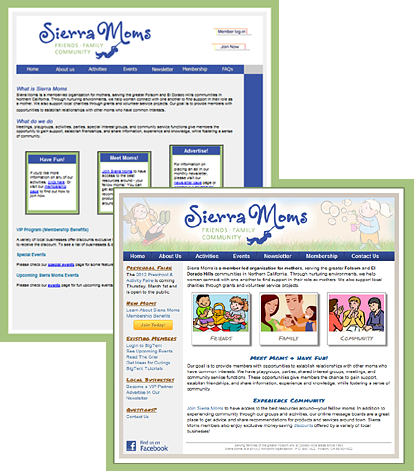
Certainly, there are still things I think could be better UI-wise, but its a huge improvement, and I’m going for incrementally better changes. By the time I got done with the new homepage, it had been so long since I’d gone back and looked at what I started with, that I’d almost forgotten some of the things I had fixed early on, like the random checkerboard pattern, and half of the headings being images without alt text, in a different color and font-style than the other headings on the page.

I’m going to have a featured article in next month’s member newsletter letting them know about some of the changes. Here’s an excerpt from my article:

Website Update

If you’ve been to our public website recently, you’ve probably noticed some changes. […]

Behind the scenes I’ve been working on sprucing up the website, doing lots of things that you probably haven’t noticed like search engine optimizations and new “404 error” pages, as well as some much more apparent changes like the new look for the home page and additional content throughout the site.

We now have a new contact form where you can easily contact a variety of club officers without having to keep track of who is fulfilling that role at the moment.

There is also a new playgrounds and outings guide that I’m particularly excited about. I’m always looking for ideas on fun things to get out and do, and being new to the area, I don’t automatically “just know” everything there is to do around here, so it was a great discovery to find a list of local attractions collecting dust in the files area. The list has been updated and now is on the website where you can easily share it with your friends, including ones who aren’t members—yet!

Another new addition to the website is a section with visual tutorials on how to use BigTent. To be honest, even I, a total geek who “should” know how to do that kind of stuff, had to search the help area to figure out how to leave a subgroup, so if there’s something that seems like it ought to be easy to do, but isn’t obvious, it’s probably not just you! So I’ve taken some of Ivette’s wonderful BigTent tutorials and added screen-shots and put them on the public website where they should be easy to find, and added direct links to some of the other existing tutorials. Same content, now easier to find.

There are still many more changes in the pipeline, so check back from time to time to see what’s new! And feel free to use the new contact form to send in your comments and suggestions on how we could make the website even more awesome!

Aside from the stuff mentioned in that article, other changes included things like a password protected file upload form with PHP script to let the member discount coordinator update the member discount PDF without me having to upload it and re-link it for her every time (FTP + non-techy = just not going to happen).

I also made “user friendly” 404 pages (and 401, 500, etc), that clearly let you know the page wasn’t found, but still has the navigation available to get back into the rest of the site even if you hit an unexpectedly bad link.

I also updated the entire site’s URL structure to make the URLs more logical. Having a folder called /pages/ in the url is kind of useless information to the person viewing the site. So the new urls follow a hierarchical structure and use folder names instead of filenames (so they don’t have to worry about whether it’s .php or .html), and of course I set up all the redirects in apache so incoming links from search engines don’t break and we don’t lose the page-ranks. And added the right meta-tags to make the snippets shown on google be the important part of the page, so the stuff shown is a bit more meaningful to people searching for the page, etc.

Embedded Iframes

Working with 3rd party embeddable widgets can often enhance the user experience by allowing you to show information you wouldn’t otherwise have access to, or save a click or two to get to a third-party login page, etc. However, not all 3rd party embedding APIs are created equal.

One in particular that I’ve been working with has absolutely no customization options, and the only option for how to embed it is with an iframe. This severely limits the options I have as far as integrating the widget into the rest of the page. The rest of the page has headings in blue, in Arial, and the widget? No way to customize that font.

I’ve looked into it multiple times, but without control over the domain hosting the widget, there’s no way to add CSS to within the iframe, because even if you add the CSS with javascript, you still have to have the CSS on the same domain as the iframe because of cross-site scripting safety.

I did at least find some answers about the limited customizations I do have. You can change the margins, padding, and border, basically, the frame itself. The couple interesting things you can do is use CSS3 features to add shadows to the border, or even rotate the frame (though in my testing the rotation looks terrible and isn’t up to the quality needed to look decent) to at least make the sticking out like a sore thumb widget look intentionally stand-out from the rest of the page…sort of…I’d rather have it at least have matching fonts…but until I figure out some way to do that using an API with no “attach stylesheet” option, my hands are tied.

Delphi 7 for Java Programmers

Comments

Comment Style Java Delphi
// comment yes yes
/* comment */ yes no
(* comment *) no yes
{ comment } no yes

Delphi convention: (* code *) vs {Textual Comment}

Procedure vs Function
Method in Java = either “function” (if it has a return value) or “procedure” (if it has no return value) in Delphi

Overloading a procedure:
In the interface section of your unit, add “overload;” at the end of both overloaded versions of the procedure.

    procedure TranslateForm(form : TTntForm); overload;
    procedure TranslateForm(form : TForm); overload;

Exceptions

Java Delphi
Try Try
Catch Except
Finally Finally
Throw Raise

In order to have both an Except and Finally block for the same line of code, you have to nest Try blocks, like this:

Try
  Try
    causeSomeRandomException();
  except
    on E:Exception do ErrorMsg(num,'Error:',E.Message,True);
  end;
finally
  doSomeCleanup();
end;

Other suggested reading:
http://techinorg.blogspot.com/2008/09/delphi-for-java-developers.html
Comments on some of the differences the author found less enjoyable

http://www.webbasedprogramming.com/Java-Developers-Reference/ch5.htm
It’s going the other way Delphi to Java, so it’ll point out areas of difference, but not the Delphi syntax.

http://www.marcocantu.com/papers/ooplang.htm
Compares C++, Java, and Object Pascal (Delphi)’s OOP Features.

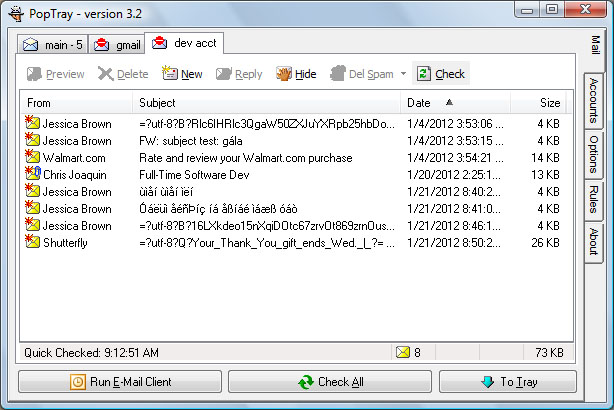
PoptrayU: Updated Screenshot

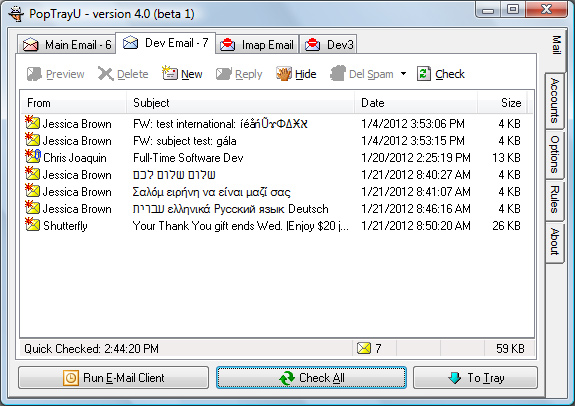
Here’s an updated screenshot with my progress over the past few days:

You’ll notice now that the two emails with subjects in Hebrew and Greek (probably horribly translated, I just used Google Translate) now appear correctly in the main window.

Getting these messages to appear correctly was actually quite tricky to figure out. The key, in the end, was that I had to make a copy of the subject field before the Indy routine ProcessHeaders mangled it into Ansi characters, and then call my DecodeHeader algorithm on the un-mangled header.

The ironic thing is, if I upgraded to the latest version of Delphi, and the latest version of Indy (as in Indy10 rather than as in Indy9.0.53), the whole DecodeHeader and handling international characters would be a non-issue. But then I’d have a whole different can of worms–I’d have to fix all the non-backward compatible changes between Indy 9 and 10, I’d have to figure out how to convert ActionBand Popups into the new Delphi 2010 equivalent. In the end, what it would take to port the app to a newer version of Delphi is probably more difficult than coercing the old version of Delphi and Indy into doing what I want it to do. Sure, in the end it might end up being more robust that way, but I might also break and mangle lots of existing features.

At this point, what you see in the screenshot, I am only processing the Subject field with the new technique that works for any codepage (vs: only the current one or UTF-8), so I need to extrapolate my strategy to the other header fields that might be encoded. I also need to find an equivalent strategy to do the same thing on the Preview window. In the preview window it re-downloads the email through a different Indy code-path, and I haven’t found the right place in that code-path where I can capture the un-mangled header yet. So there’s still work to do but I’m on the right path.

To convert the random code-page to Unicode, I am using the windows library function WideCharToMultiByte, which converts a string to a “wide” (Unicode) string based on a specified code page number. Getting the code page number was also a little bit of a challenge. The library with that function doesn’t have a GetCodePageNumber function to convert the code page *name* to the windows code page *number*. There is a DLL that comes with windows that has (almost) that function, but figuring out how to call it is kind of tricky, and rumors on the internet say it might be buggy in certain cases. So, I’m using the straightforward but ugly strategy: convert the table on MSDN of allowed code-page names/IDs to a data structure and look it up manually. That list isn’t the full IANA supported list of encodings (aliases/alternate names), but the cases it doesn’t handle are likely to be rare, and could be added in the future if future research doesn’t find a better strategy.

I started out storing the list in a record (ie: Delphi equivalent of a struct) with a dead simple sequential search algorithm, per a tip on StackOverflow, but I wasn’t happy with the performance on lookup, because there’s 140 different encodings in my list of encodings so far, and this method is going to be called in a loop for each header of each email unless it’s definitely not encoded. So I did some research and found TStringList which can be used like a sorted map with better string search performance, and THashedStringList, which is basically a hash-map data structure, so even better string search performance–up to the level you need for, get this, INI FILES! Then I had to do more research to figure out what the Delphi equivalent of a static initializer is to use the Hashed String List…But now that I have it working, it does seem noticeably faster even on a small number of emails, but the internet could just be less congested today, it’s hard to say.

Delphi Reflections

As I continue to learn and work with Delphi, I am finding it to be quite an enjoyable language to program in. Sure, those begin-end blocks with the wordy labels for where they begin and end are a little harder to read than braces would be. But there’s also some little niceties, like single character delimiters for inline comments, that are not the same delimiters you would use to comment out a large block of code temporarily. There are certainly disadvantages to using such an old version of the language/IDE, I dearly miss “find references”, which would be super-useful considering I didn’t write most of the code and have to spend much time discovering how it works. Having struct equivalents, and super-flexible sorted string lists that can be just lists or maps or…(TStringList, THashedStringList)

I also like the UI for editing the GUI fairly well, the stretch to fill client area option and setting the anchor points seems a lot more intuitive to me than some of the Java layout managers/UI editors. I like the power and flexibility that Delphi is so closely related to the C++ language of families that you can use certain C++isms (eg: String pointers) when you need them, but pretend they don’t exist the rest of the time. And being able to use functions from the Windows API makes me feel a little bit at home from my C++ programming days.

Overall, this has been a really fun project to work on, even with the not knowing the language well handicap (yes, there has been LOTS of Googling. Especially since Barnes & Noble didn’t have ANY Delphi related programming books in stock. Maybe next time I’m in the Bay Area I could acquire a printed book or two?

Before And After Screenshots

I thought I’d share some before and after screenshots of the work I’ve done so far.

Here’s the main screen of the application before:

And here is the after shot:

You’ll notice two of the emails look like gibberish both in the before and after shots. Those were test emails I created with subjects in a single foreign language (one is in Hebrew, and one in Greek), so Outlook decided to encode them with the encodings windows-1255 and iso-8859-7 respectively. This is a case I’d like to handle better in the future. But even without that, still a much more usable version.

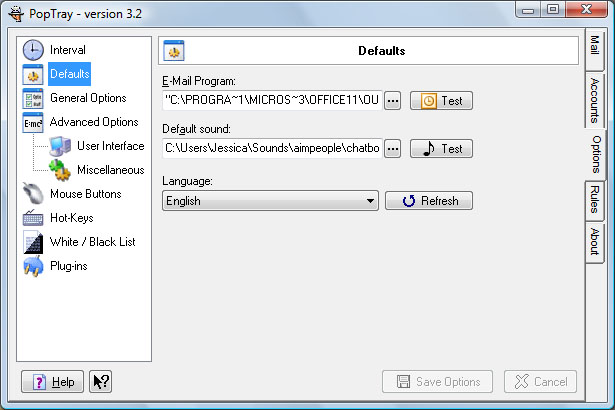
And for fun, here’s another screen I’ve been working on. It is supposed to look like this (in the old version of PopTray):

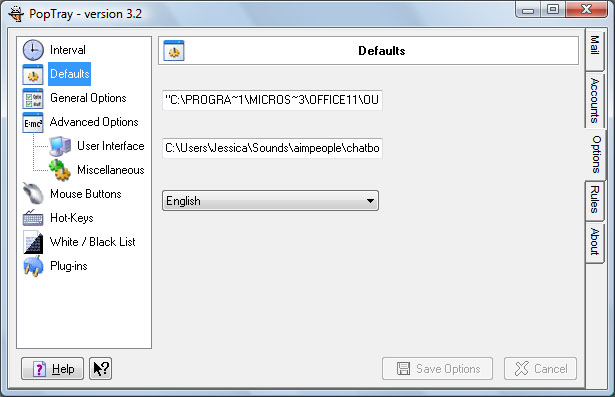
But if you’re using Vista or above, and using the Aero theme, because of some screen refresh bugs (not specific to the app) usually it looks more like this:

So my changes to this screen include moving the alignment of the buttons to “cling” to the right side of the window, and adding code in the window resize to stretch the textboxes when you resize the window. Textboxes that are too small that don’t resize when you make the window bigger is a pet peeve of mine. So I thought I’d fix it.

And while I was at it, I looked into workarounds for the refresh issues, and found that adding a call to refresh the inner panel (aka “frame” in delphi) with the missing labels and buttons on create and after the window is resized reduces the problem by about 95%, as in, it displays correctly on load and it’s only a problem now if you drag the window off the screen and back, but if you resize the window it redraws it properly, so it’s much easier to work around. If I ported the app from Delphi 7 to a newer version of Delphi this problem would probably go away entirely, so it’s not really worth the investment to try to workaround that last 5% issue.

Sourceforge Recovered!

I finally recovered access to my SourceForge account, so I was able to contact the original developer of PopTray about enhancing it. He suggested I should fork the code and create my own base with a new name, and if he likes it he might even add a link from the PopTray homepage.

So now I need to think of a new name for my improved version of PopTray. Better PopTray? PopTrayEx? PopTray Enhanced? PoptrayPlus? Hmmm…Decisions

New Bug to Fix

I had an email in my inbox today from Shutterfly with a subject in Base-64 encoding. Only, the subject was so long in Base-64 that it didn’t all fit on a single line in the email headers. Which means my base-64 subject decoder needs to be a little more robust.

The raw-header looks like this:

Subject: =?UTF-8?B?WW91ciBUaGFuayBZb3UgZ2lmdCBlbmRzIFdlZC4gfCBFbmpveSA=?=
=?UTF-8?B?JDIwIGp1c3QgZm9yIHlvdcKg?=

Notice anything odd about the format of this header? Each line has it’s own encoding tags, instead of one encoding tag spanning both lines, so it’s a little different than what I’ve seen on long subjects encoded with quoted-printable. Converted from Base 64 to English, the subject should parse into:

Your Thank You gift ends Wed. | Enjoy
$20 just for you

No weird special characters or anything that really necessitates base-64, but none the less to be a robust email parser, this kind of case should probably be handled.

In Delphi, I get a single string with the entire header except the word “Subject: “, but including the line break returned from Indy. This means I can’t just say from after the B? to the very end minus two characters, I need to actually tokenize the ending question-marks and/or whitespace, and encoding begin strings, perhaps in a loop, so I can pull out just the base 64 encoded part:

WW91ciBUaGFuayBZb3UgZ2lmdCBlbmRzIFdlZC4gfCBFbmpveSA=
JDIwIGp1c3QgZm9yIHlvdcKg

And then pass that lovely string into the base64 decoder. And then instead of a subject of

=?UTF-8?B?WW91ciBUaGFuayBZb3UgZ2lmdCBlbmRzIFdlZC4gfCBFbmpveSA=?= =?UTF-8?B?JDIwIGp1c3QgZm9yIHlvdcKg?=

you could have a subject of

Your Thank You gift ends Wed. | Enjoy $20 just for you

Bugs Fixed!

Two bugs fixed! The first was trivial, adding one line of code for a case I had overlooked initially. The second was more subtle. I eventually tracked down the cause to a less common variant in the MIME headers.

Here’s a typical MIME header:

Content-Type: text/plain; charset="UTF-8"
Content-Transfer-Encoding: quoted-printable

And here’s the header I was seeing in the error producing email:

Content-Disposition: inline
Content-Transfer-Encoding: 8bit
Content-Type: text/html

Notice anything majorly different? Take a look at that content-type. In the second-example, it didn’t specify the charset, so there’s no semicolon after the content type string. And that meant that some existing code that parsed out the content-type would fail if the charset was missing. Position of semi-colon returning zero (not found) when you want it to return end of string if not found…slight difference, now it gets the full content-type in the latter case instead of a blank string and displays correctly.